Showing My 12-Year-Old How to Guide AI: Build a Plant Simulator
By Andrei Roman
My 12-year-old son studies biology. He had an idea: a plant simulator like Plague Inc, but you manage a plant species. Evolve traits to adapt to soil types, survive herbivores, attract pollinators. We built it in one day, noon to evening (and added finishing touches the next morning). Here is how we guided AI to build accurate simulation, not game theater.
The Teaching Moment
This was not about building a game. It was about teaching my son how to guide AI to build things that match reality, not fantasy. Biology textbooks teach photosynthesis equations. AI can turn those equations into running code. The skill is knowing what to ask for.
Lesson one: Start with architecture, not code. Define the engine, the data model, the visual interface. AI cannot guess what accurate means. You must specify.
The Initial Prompt
I showed my son how to write a spec prompt. Not vague (make me a plant game). Specific:
A plant simulator where you see how plants work and what affects them. Gases in the air. Sunlight. Soil quality. Seasons. Animals. Insects. Mushrooms. Something like Plague Inc but you manage a plant species. Start small. Direct the design of the species to adapt to various soil types and environments. Prevent being eaten by certain animals but evolve traits to encourage other species to eat you and spread your seeds.
Web browser game. TypeScript. 2D canvas engine for drawing.
Plan every detail first. The engine. The UX.
AI Response: Engineering Specification
AI refused to jump to code. It demanded architecture decisions first. Good. This is what we want kids to learn.
The system follows Model-View-Controller (MVC). Three layers:
Simulation (Model): Pure TypeScript module. Holds world state (grid data, atmosphere, plant entities). Runs on fixed timestep. Deterministic. No knowledge of Canvas or DOM.
Renderer (View): 2D engine reads simulation state, draws to Canvas. Interpolates between ticks for smooth animation.
Controller (Input/UI): Handles user interaction (evolution menu, pausing time, map clicking). Mutates simulation state via strictly defined actions.
Lesson two: Separate deterministic simulation from presentation. Biology and physics are pure logic. Graphics are interpretation.
The Interface Design
I showed my son how to refine the prompt with visual specifications. Not just describe features. Describe layout.
Four quadrants:
Top-left (Air): Shows plant above ground. Sky changes with time of day (dawn, noon, dusk, night). Weather system: rain, snow, fog. Flying insects. Herbivores. Procedural drawing of plant shoot (L-system or Bezier curves). Height, leaf color, flower shape drawn from species genome.
Bottom-left (Soil): Shows plant below ground. Soil strata (sand, clay, silt mix). Water saturation gradient. Procedural root generation. Depth and spread depend on genome. Micro-fauna: worms, nematodes, mycelium networks.
Top-right (World Map): Global strategy view. Tilemap with biome colors (desert, forest). Species density overlay (green alpha channel). Click tile to inspect specific plant. Left quadrants update to show that plant.
Bottom-right (Evolution UI): Spend DNA points (earned by successful reproduction/survival) to mutate genome. Trait upgrades: root depth, leaf area, toxin level, fruit sweetness.
Lesson three: Visual specificity matters. AI cannot infer what good UX looks like. You must design it.
The Biology Model
This is where accuracy matters. We are teaching biology through simulation. If the simulation lies, the teaching fails.
Environment (The Grid): Cellular automata grid using Float32Array for cache locality. Four layers: Soil water (0.0 to 1.0), Soil nitrogen (0.0 to 1.0), Soil phosphorus (0.0 to 1.0), Sunlight incident (calculated per tile based on shading and time of day/year).
Plant Agent (The Species): Genome is JSON object defining base stats (root depth, leaf area, toxin level, fruit sweetness). Individual plant instances occupy grid tiles. Lifecycle: Germinate, vegetative growth, reproductive, senescence (death).
Atmosphere (Global State): CO2 PPM affects photosynthesis rate. Temperature affects water evaporation and enzyme efficiency. Season phase is sinusoidal wave driving temperature and sunlight duration.
Biota (The Actors): Finite state machines for animals and insects. Pollinators move towards high scent or color values. Herbivores move towards high biomass values, repelled by toxin values.
Lesson four: Real equations produce real behavior. Photosynthesis (Calvin cycle inputs), nutrient tracking (N-P-K), water transpiration. Not abstracted food and water. Actual biology.
The Game Loop
Decoupled loop. Simulation runs at fixed timestep (20 ticks per second). Renderer runs as fast as requestAnimationFrame allows.
Accumulator tracks time passed since last frame. Update (simulation) runs in fixed steps. If renderer lags, simulation catches up. Render draws state after last update.
Each tick: Simulate climate. Simulate diffusion (water and nutrients moving between tiles). Simulate biota. Simulate plants.
Lesson five: Deterministic simulation requires fixed timestep. Frame rate cannot affect biology.
The Debug Session
First version had bugs. This is the teaching moment. Debugging is not failure. Debugging is engineering.
Problem one: Seedling starvation. Plants died immediately after germination. Energy consumption (respiration) exceeded energy production (photosynthesis). Fixed by tuning biology constants. Photosynthesis base rate: 0.6 → 0.8. Respiration rate: 0.15 → 0.02. Starting energy: 10 → 50. Starting leaf area: 0.001 → 0.005.
Problem two: Visualization scale broken. Seedlings invisible (too small). Trees clipped (too large). Fixed by implementing auto-zoom camera. Dynamic scale based on plant height. If baby, zoom in (macro lens). If giant, zoom out (wide angle). Target screen ratio: 60 percent of viewport height.
Problem three: Root rendering broken. Morphology data showed 12m root depth. Visuals showed tiny 2-3 segment roots near surface. Root laterals generating near top of taproot, not distributed along length. Fixed by using proportional recursive branching like shoot system. Each child is 40-70 percent of parent length, spreading outward.
Lesson six: Simulation accuracy requires parameter tuning. Biology constants are not guesses. They are calibrations.
The Seasonal Phenology
Final feature: realistic seasonal cycles.
Autumn: Leaf color change (green to orange/red/brown based on temperature). Leaf drop (deciduous species). Reduced photosynthesis.
Winter: Dormancy (no photosynthesis). Reduced respiration (metabolic slowdown). Snow accumulation on branches.
Spring: Leaf regrowth (energy cost). Flowering (energy allocation). Pollinator attraction.
Summer: Maximum photosynthesis. Fruit development. Seed maturation. Reproduction cooldown after fruiting.
Lesson seven: Seasonal cycles are not cosmetic. They are survival constraints. Deciduous trees evolved leaf drop because maintaining foliage in winter costs more energy than photosynthesis produces.
What My Son Learned
AI is not magic. It is a tool. The tool quality depends on specification quality.
Architecture matters more than code. Define the system before implementing the system.
Real equations produce real behavior. Fake equations produce game theater. We are building simulation, not theater.
Debugging is engineering. Tuning constants, fixing broken visualizations, calibrating biology parameters. This is not failure. This is the work.
Visual specificity matters. AI cannot infer good UX. You must design it explicitly.
Constraints enable creativity. Deterministic simulation, fixed timestep, decoupled rendering. These constraints force correct thinking.
The Bigger Picture
This is how the next generation learns to build with AI. Not by accepting whatever AI produces. By guiding AI to produce what reality requires.
My son now understands: Photosynthesis is not just a diagram in a textbook. It is a rate equation. Nutrients concentration, light intensity, temperature, water availability. Real inputs. Real outputs. Real constraints.
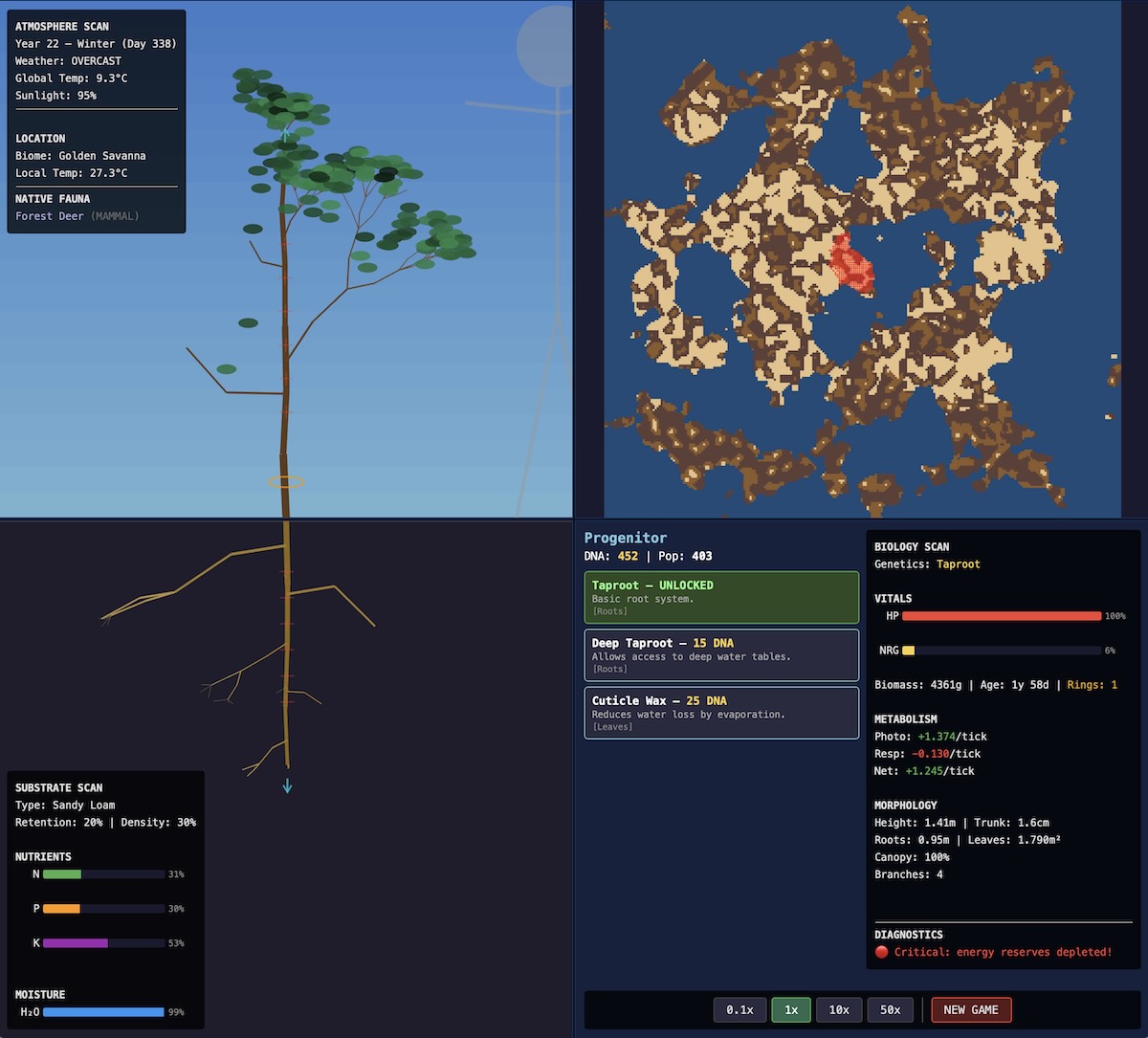
He also wants to take this in a different direction now: more like a video game. He said - why should I let the simulator balance everything out? Where is the fun in that? It should tell me what the problems are and I should work to fix them - add branches, add leaves, grow the root, make flowers. And let's see how plants spread out and start growing on the map.
That was done the next morning... All in all one full day of work.
But this is what education with AI looks like. Not replacing teachers. Not replacing textbooks. Turning textbook equations into running simulations that show cause and effect in real time.
The Technical Stack
TypeScript for type safety. PixiJS for canvas rendering (WebGL with Canvas fallback). Fixed timestep game loop (20 ticks per second). Decoupled simulation and rendering. Float32Array for grid data (cache locality). Cellular automata for nutrient diffusion. L-system for procedural plant drawing. Finite state machines for animal behavior.
Browser-based. No backend. Progress saved in localStorage. Responsive design (4 quadrants on desktop, 2 quadrants with toggle on mobile).
Built in one day. Noon to evening. With a 12-year-old asking questions and learning how to guide AI.
The Result
A running plant simulator here on github. Seedlings grow into trees. Roots reach deep for water. Leaves change color in autumn and drop for winter. Pollinators visit flowers. Herbivores eat biomass (planned). Seeds disperse and germinate.
Not a game. A simulation. Biology that matches reality. Equations that produce emergent behavior. My son can now evolve plant species and see why certain traits succeed in certain environments.
This is the future of education. Not AI replacing learning. AI making abstract concepts concrete. Turning equations into interactive experiments.
Discussion (0)
No comments yet. Be the first!